
DD系统脚本
之前狗云可以用煎饼大佬的一键DD/重装脚本的DD脚本,后面不行了不知道为什么
后面在NS大佬推荐下,用 bin456789 大佬脚本DD成功
部分引用:https://reinstall.xyz/#leitbogioro
【DD脚本 合集】
- 煎饼大佬的一键DD/重装脚本
# 海外
curl -O https://raw.githubusercontent.com/bin456789/reinstall/main/reinstall.sh
# 国内
curl -O https://gh.kejilion.pro/raw.githubusercontent.com/bin456789/reinstall/main/reinstall.sh
bash reinstall.sh debian 12- bin456789 大佬【GitHub】
wget --no-check-certificate -qO InstallNET.sh 'https://raw.githubusercontent.com/bin456789/reinstall/main/reinstall.sh' && chmod +x reinstall.sh- 萌咖【GitHub】
wget --no-check-certificate -qO InstallNET.sh 'https://raw.githubusercontent.com/veip007/dd/master/InstallNET.sh' && chmod +x InstallNET.sh- 1keydd【GitHub】【个人感觉最适合dd windows的脚本】
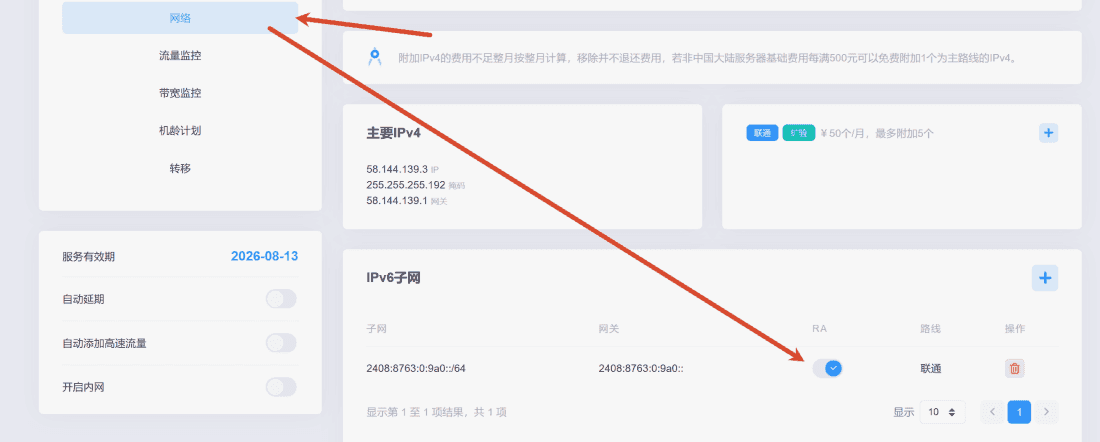
wget -qO- inst.sh | bash狗云后台打开IPv6子网开关
配置IPV6
interfaces文件
/etc/network/interfaces- 【未DD系统前】之前idc原版的系统里的配置是这样的:
auto lo
iface lo inet loopback

auto net0
iface net0 inet static
    address 58.144.139.3
    netmask 255.255.255.192
    gateway 58.144.139.1
dns-nameservers 8.8.8.8 8.8.4.4- 【DD系统后】
source /etc/network/interfaces.d/*

# The loopback network interface
auto lo
iface lo inet loopback

# The primary network interface
allow-hotplug ens3f0np0
iface ens3f0np0 inet static
address 58.144.139.3/26
gateway 58.144.139.1
# dns-* options are implemented by the resolvconf package, if installed
dns-nameservers 119.29.29.29 223.6.6.6
dns-search debian
修改interfaces文件
再后面加上iface ens3f0np0 inet6 auto,注意ens3f0np0网卡和IPV4的一样。
source /etc/network/interfaces.d/*

# The loopback network interface
auto lo
iface lo inet loopback

# The primary network interface
allow-hotplug ens3f0np0
iface ens3f0np0 inet static
    address 58.144.139.3/26
    gateway 58.144.139.1
    # dns-* options are implemented by the resolvconf package, if installed
    dns-nameservers 119.29.29.29 223.6.6.6
    dns-search debian

iface ens3f0np0 inet6 auto
重启 networking
systemctl restart networking查看是否显示IPV6
ip -6 addr show2408:8763:0:9a0:ac0:ebff:feb7:a188就是获取到的IPV6地址
root@DS6400:~# ip -6 addr show
1: lo: <LOOPBACK,UP,LOWER_UP> mtu 65536 state UNKNOWN qlen 1000
    inet6 ::1/128 scope host noprefixroute
       valid_lft forever preferred_lft forever
2: ens3f0np0: <BROADCAST,MULTICAST,UP,LOWER_UP> mtu 1500 state UP qlen 1000
    inet6 2408:8763:0:9a0:ac0:ebff:feb7:a188/64 scope global dynamic mngtmpaddr proto kernel_ra
       valid_lft 2591760sec preferred_lft 604560sec
    inet6 fe80::ac0:ebff:feb7:a188/64 scope link proto kernel_ll
       valid_lft forever preferred_lft forever
4: br-bda51f90d037: <NO-CARRIER,BROADCAST,MULTICAST,UP> mtu 1500 state DOWN
    inet6 fe80::4861:33ff:fe7b:335b/64 scope link proto kernel_ll
       valid_lft forever preferred_lft forever
5: docker0: <NO-CARRIER,BROADCAST,MULTICAST,UP> mtu 1500 state DOWN
    inet6 fe80::ac8c:9fff:fe25:d1a4/64 scope link proto kernel_ll
       valid_lft forever preferred_lft forever